Every organisation has data trapped in documents. Invoices, bank statements, lab reports, purchase orders, contracts, forms — information that exists, is needed in a system, and is currently moved there by someone typing.
Document data extraction automates that. This guide covers how it actually works, what makes a document easy or hard, and the design decisions that determine whether a project delivers or quietly becomes a manual process with extra software.
The Fundamental Split: Native or Scanned
Before anything else, establish which kind of PDF you have. The two need completely different treatment, and mixing them is the first cause of poor results.
| Native / digital PDF | Scanned PDF | |
|---|---|---|
| Contains | A real text layer with character positions | An image of a page |
| Extraction | Direct parsing — deterministic | OCR — probabilistic |
| Accuracy | Effectively 100% for the text layer | 85-99%, depending on scan quality |
| Speed | Milliseconds | Seconds per page |
| Main challenge | Table structure and reading order | Character recognition |
The test: open the PDF and try to select text. If you can, there is a text layer. If the cursor draws a box over an image, it is a scan.
Most real-world document sets are mixed — some suppliers send digital invoices, others send phone photographs of printed ones. A production pipeline has to detect which is which per file and route accordingly. Assuming a uniform input is the single most common architectural mistake in these projects.
The Extraction Pipeline
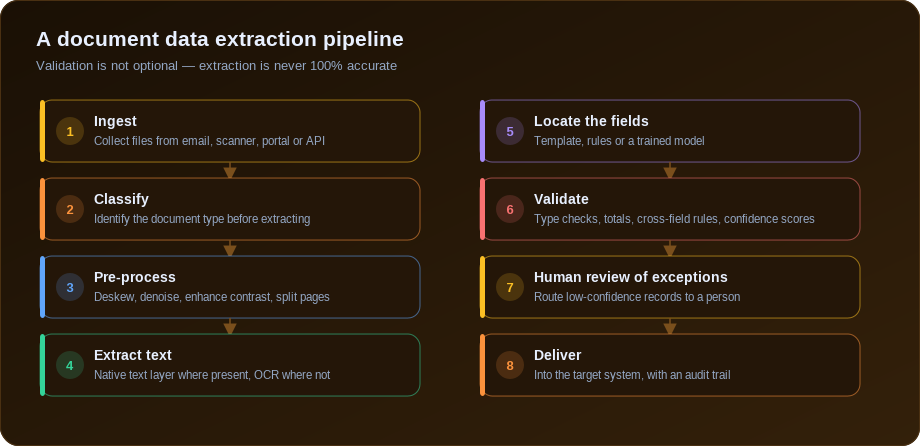
| Stage | What happens | Why it matters |
|---|---|---|
| 1. Ingest | Collect files from email, scanner, portal or API | Determines volume, latency and formats |
| 2. Classify | Identify the document type | You cannot extract invoice fields from a delivery note |
| 3. Pre-process | Deskew, denoise, enhance contrast, split pages | Largest single lever on OCR accuracy |
| 4. Extract text | Native text layer where present, OCR where not | The step everyone focuses on |
| 5. Locate fields | Template, rules or a trained model | Where the actual value is created |
| 6. Validate | Type checks, totals, cross-field rules, confidence scores | Non-negotiable |
| 7. Human review | Route low-confidence records to a person | Makes the system trustworthy |
| 8. Deliver | Into the target system, with an audit trail | Where the value is realised |
Two stages get less attention than they deserve.
Classification (stage 2) is what makes a pipeline general rather than brittle. Without it you are building one pipeline per document type and routing manually — which reintroduces the manual work you were removing.
Validation and human review (stages 6-7) are what make the output usable. Extraction is never 100% accurate. A pipeline without a validation and exception path does not eliminate manual work; it converts obvious manual work into invisible errors in a database, which is strictly worse.
Choosing an Extraction Method
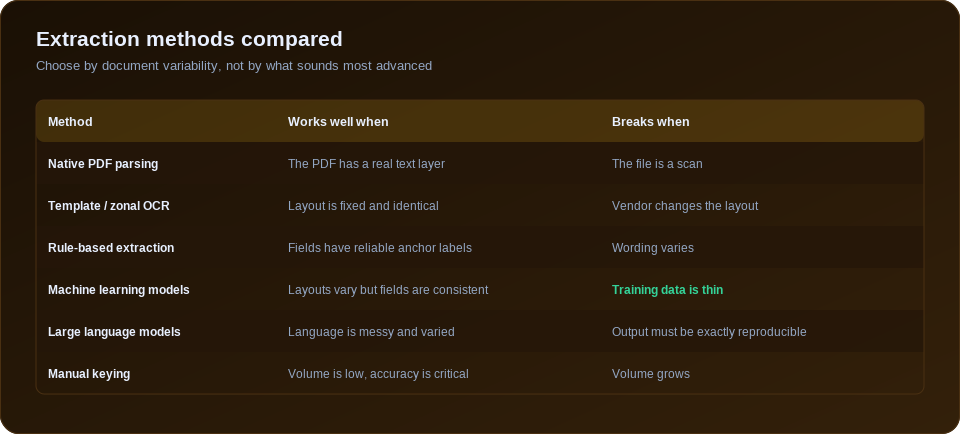
| Method | Works well when | Breaks when |
|---|---|---|
| Native PDF parsing | The PDF has a real text layer | The file is a scan |
| Template / zonal OCR | Layout is fixed and identical every time | The vendor changes their layout |
| Rule-based extraction | Fields have reliable anchor labels | Wording varies between documents |
| Machine learning models | Layouts vary but fields are consistent | Training data is thin |
| Large language models | Language is messy and highly varied | Output must be exactly reproducible |
| Manual keying | Volume is low and accuracy is critical | Volume grows |
The decision is driven by layout variability, not by which technology sounds most advanced.
One supplier sending an identical invoice layout every month is a template problem, and a template will beat a model on both accuracy and cost. Four hundred suppliers each with their own layout is a model problem, because maintaining 400 templates is a full-time job that never ends.
A common and effective production design is layered: try the template for known layouts, fall back to rules for anchor-labelled fields, fall back to a model for the rest, and route anything still low-confidence to a human. Each layer handles what the one above cannot, and the cheap deterministic layers carry most of the volume.
How Hard Is Your Document?
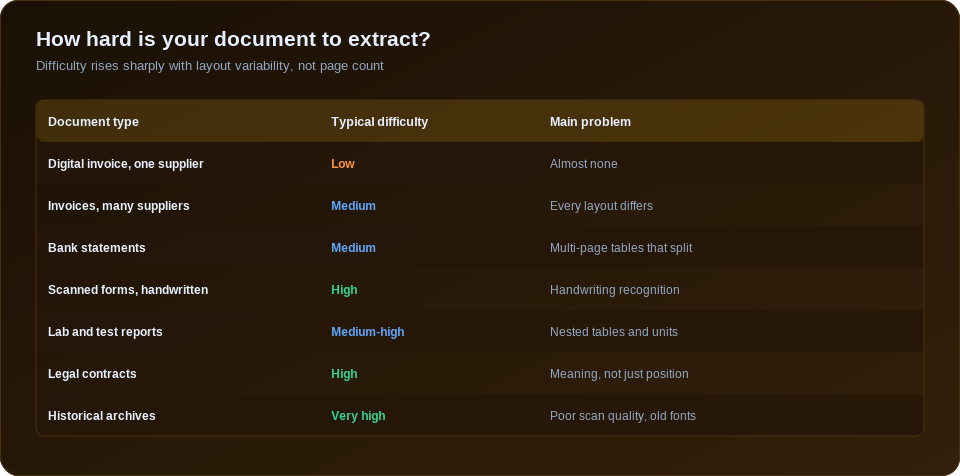
| Document type | Difficulty | Main problem |
|---|---|---|
| Digital invoice, one supplier | Low | Almost none |
| Invoices, many suppliers | Medium | Every layout differs |
| Bank statements | Medium | Multi-page tables that split across pages |
| Purchase orders | Low-medium | Usually structured, sometimes scanned |
| Lab and test reports | Medium-high | Nested tables, units, reference ranges |
| Scanned forms, handwritten | High | Handwriting recognition |
| Legal contracts | High | Meaning matters, not just position |
| Historical archives | Very high | Poor scan quality, old fonts, faded print |
Difficulty rises with layout variability, not page count. A 200-page report in one consistent format is far easier than 200 single-page invoices from 200 suppliers.
Tables deserve their own warning. A table spanning pages, with merged cells, nested headers or wrapped rows, is genuinely hard — reconstructing which value belongs to which row and column when the visual structure carries the meaning is the single most common source of silent errors in financial document extraction.
Validation: Where Trust Comes From
Extraction produces candidate values. Validation decides whether to believe them.
| Check type | Example |
|---|---|
| Type and format | Is the date a date? Is the amount numeric? |
| Range | Is the invoice value within plausible bounds? |
| Arithmetic | Do line items sum to the subtotal? Subtotal + tax = total? |
| Cross-field | Is the invoice date before the due date? |
| Reference data | Does the supplier ID exist in the master file? Is the GSTIN valid? |
| Duplicate detection | Have we seen this invoice number from this supplier already? |
| Confidence threshold | Did the extractor report low confidence on this field? |
The arithmetic check is the most powerful, because it is self-validating: if line items sum to the stated total, the numbers were almost certainly read correctly. One reconciliation catches character-level OCR errors that no confidence score would flag.
Design the confidence threshold deliberately. Too high and everything goes to human review, eliminating the benefit. Too low and errors reach the database. Start conservative, measure the error rate in the auto-approved stream, and relax the threshold as the evidence supports it — never the other way round.
Measuring Accuracy Honestly
"99% accurate" is meaningless without saying accurate at what level.
| Metric | Definition | Typical achievable |
|---|---|---|
| Character accuracy | Correct characters / total characters | 98-99.5% on good scans |
| Field accuracy | Fields fully correct | 90-98% |
| Document accuracy | Documents with every field correct | 70-95% |
| Straight-through rate | Documents needing no human touch | The number that matters commercially |
The arithmetic is unforgiving. At 98% field accuracy across 15 fields, the probability that a whole document is correct is 0.98¹⁵ ≈ 74%. A vendor quoting 98% accuracy may be describing a system where a quarter of documents need review.
Straight-through processing rate is the number to contract on, because it maps directly to labour saved.
Build or Buy
| Option | Best for | Watch out for |
|---|---|---|
| Commercial IDP platform | Common document types, moderate to high volume | Per-page pricing at scale; limited customisation |
| Cloud APIs (Document AI, Textract) | Standard documents, developer teams | Per-page cost; data residency |
| Open source (Tesseract, pdfplumber) | Native PDFs, unusual documents, cost control | Engineering effort; you own accuracy |
| Custom-trained models | High volume, distinctive documents | Training data, MLOps, ongoing maintenance |
| Outsourced manual keying | Low volume, very high accuracy needs | Cost scales linearly with volume |
| Hybrid | Most real deployments | Integration complexity |
For native PDFs with consistent structure, open-source parsing is fast, free and deterministic — reaching for a cloud API is often unnecessary cost. For mixed-quality scans across many layouts, a commercial platform or cloud API usually beats building from scratch.
What Makes These Projects Fail
No exception path. Everything is auto-processed, errors reach the database, and someone eventually finds them in a reconciliation. Trust never recovers.
Assuming input uniformity. The pilot used clean samples; production receives phone photographs at an angle.
Ignoring the source of documents. Getting suppliers to send digital invoices instead of scans eliminates the hard part entirely. Fix the input before engineering around it — this is routinely the cheapest available improvement and it is routinely skipped.
Optimising OCR instead of pre-processing. Scan quality dominates accuracy far more than engine choice.
No feedback loop. Human corrections should train the system. Corrections that vanish into the target system are a wasted asset.
Measuring the wrong thing. Character accuracy looks impressive and does not predict labour saved. Straight-through rate does.
Underestimating table extraction. Budgets assume flat fields; the tables consume most of the effort.
Frequently Asked Questions
What is document data extraction? Automatically pulling structured data — fields and tables — out of unstructured or semi-structured documents such as PDFs, scans and images, and delivering it into a system.
How do I extract data from a PDF? If it has a text layer, parse it directly. If it is a scan, pre-process the image and run OCR, then locate fields by template, rules or a trained model.
How accurate is PDF data extraction? Character accuracy of 98-99.5% is achievable on good scans, but full-document accuracy is typically 70-95% depending on field count and layout variability.
What is the difference between OCR and data extraction? OCR converts an image into text. Extraction determines which text corresponds to which field — a separate and usually harder step.
Can it handle handwriting? Modern handwriting recognition works on clear printed handwriting in structured fields. Free-flowing cursive remains unreliable and usually needs human review.
Should I use a template or a model? Templates for fixed, repeated layouts; models for many varying layouts. Most production systems use both, with templates first.
Do I still need people? Yes, for exceptions. A well-designed system routes low-confidence documents to review rather than guessing — that is what makes the automated output trustworthy.
How do I handle tables? Carefully. Multi-page tables, merged cells and wrapped rows are the hardest part of document extraction and deserve explicit design and testing.
What does it cost? Depends on volume, document difficulty and build-versus-buy. See document data extraction cost and ROI.
How long does implementation take? A pilot on one document type in weeks; a production pipeline with classification, validation and review across several document types in a few months.
Drowning in PDFs that should be a database? DSTechnoverse builds document data extraction pipelines — ingestion, OCR, field extraction, validation rules and delivery into your systems, with a human review path for exceptions. We are based in Indore, Madhya Pradesh and work with clients across India. See our data analytics and software development services, or talk to our team about your documents.