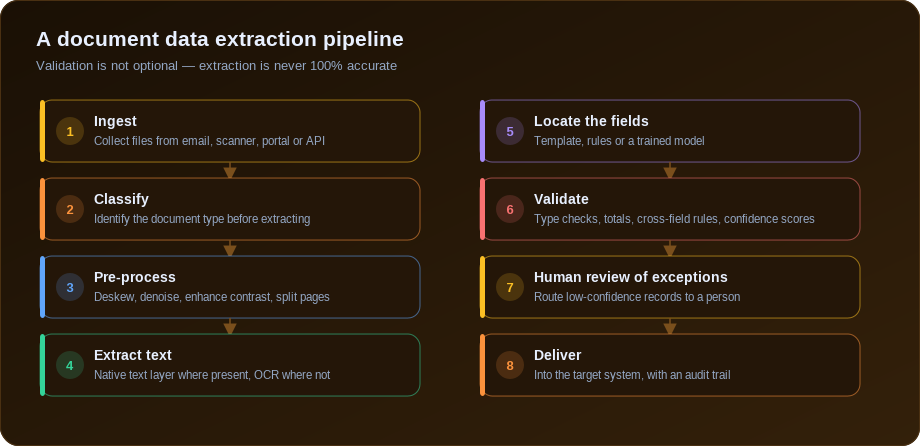
Accounts payable is the most common first target for document automation, and for good reason: invoices are high volume, structurally similar, and currently processed by people typing numbers from a PDF into an ERP.
This article covers how invoice extraction actually works, what to validate, and what determines whether the project pays for itself.
What to Capture
| Field group | Fields | Difficulty |
|---|---|---|
| Supplier | Name, address, GSTIN/tax ID, bank details | Low-medium |
| Document | Invoice number, date, due date, currency, PO reference | Low |
| Amounts | Subtotal, tax by rate, total, discount, freight | Medium |
| Line items | Description, HSN/SAC, quantity, unit price, tax rate, line total | High |
| Payment | Terms, bank account, UPI or reference details | Medium |
Line items are where the effort goes. Header fields sit in predictable places; line items are a table whose length varies, whose columns differ by supplier, and which can split across pages.
The scoping question worth asking early: do you need line items at all? Many AP processes only need header totals and a PO reference for matching. Capturing line items when the process does not use them can double the project cost for no benefit. Capture them only where three-way matching at line level, or category-level spend analysis, genuinely requires it.
The Processing Flow
- Receive — a dedicated AP mailbox, supplier portal, scanner, or EDI feed
- Classify — invoice, credit note, statement, or something else entirely
- Deduplicate — supplier plus invoice number, checked before anything else
- Extract — header fields, then line items
- Validate — arithmetic, formats, master data, tax rules
- Match — against purchase order and goods receipt
- Route — clean invoices to posting, exceptions to a person
- Post — into the ERP with the source document attached
- Archive — the original, linked to the transaction, for audit
Deduplication belongs early. Duplicate invoice payment is a real and expensive error, and suppliers legitimately resend invoices. Checking supplier plus invoice number before processing is cheap and prevents the most costly mistake in the process.
Validation Rules That Matter
| Rule | Catches |
|---|---|
| Line items sum to subtotal | OCR digit errors, missed line items |
| Subtotal + tax = total | Extraction and rounding errors |
| Tax amount matches the stated rate | Wrong rate captured, or a wrong base |
| Supplier exists in the master file | Unknown or fraudulent supplier |
| GSTIN format and checksum valid | Mis-read tax registration number |
| Invoice number not previously seen from this supplier | Duplicate submission |
| Invoice date is not in the future | Date extraction error |
| PO reference exists and is open | Wrong or missing PO |
| Amount within PO tolerance | Over-billing |
| Bank details match the supplier master | Payment redirection fraud |
That last rule deserves emphasis. Invoice fraud frequently works by altering bank details on an otherwise genuine invoice. An automated pipeline that accepts bank details from the document rather than from verified master data removes a human check that was, in that one specific respect, doing something valuable. Never take payment details from the document.
For Indian invoices, GSTIN validation is high value: the format is well defined (state code, PAN, entity code, checksum), so a mis-read character is detectable immediately rather than at reconciliation.
Three-Way Matching
The standard control: invoice against purchase order against goods receipt.
| Match type | Compares | Automation potential |
|---|---|---|
| Two-way | Invoice vs PO | High |
| Three-way | Invoice vs PO vs goods receipt | High for goods, harder for services |
| Four-way | Adds inspection or quality acceptance | Moderate |
Automation depends on tolerances agreed with finance in advance:
- Price tolerance — accept up to X% or ₹Y variance
- Quantity tolerance — accept partial delivery within a band
- Total tolerance — an absolute cap regardless of percentage
Without agreed tolerances, every rounding difference becomes an exception and the straight-through rate collapses. This is a finance policy decision, not a technical one, and it should be settled before the build.
The Number That Determines Value
Straight-through processing rate — the share of invoices posted with no human touch.
| STP rate | What it means |
|---|---|
| Under 40% | Most invoices still need a person; limited saving |
| 50-70% | Typical first-year result for a mixed supplier base |
| 70-85% | Good, mature system with supplier onboarding |
| Over 85% | High digital-invoice share and clean master data |
What actually raises it:
Digital invoices from suppliers. A supplier sending a structured e-invoice or a native PDF is processed at near-100% accuracy. Onboarding your top 20 suppliers by volume typically moves the STP rate more than any model improvement — and costs less.
Clean supplier master data. Duplicate and inconsistent supplier records generate exceptions that have nothing to do with extraction quality. See CRM and system data migration for how these problems accumulate.
Agreed tolerances. As above.
Feedback from corrections. Every human correction is training data. Systems that capture corrections improve; systems that discard them plateau.
Handling Exceptions
Exceptions are not failures — they are the system working. Design the queue properly:
| Exception type | Route to | Typical share |
|---|---|---|
| Low extraction confidence | AP clerk with the document beside the extracted fields | 10-25% |
| Validation failure (arithmetic) | AP clerk | 3-8% |
| No PO or wrong PO | Buyer or requester | 5-15% |
| Price or quantity variance | Buyer or approver | 5-10% |
| Unknown supplier | Master data team | 1-3% |
| Suspected duplicate | AP supervisor | 1-2% |
The review interface matters more than most teams expect. A clerk correcting a field should see the document image with the field highlighted, the extracted value editable beside it, and the correction saved back as training data. A review screen that forces someone to open the PDF separately and retype the value has automated nothing.
Indian-Specific Considerations
E-invoicing. Where an invoice falls under the e-invoicing mandate, an IRN and signed QR code exist, containing the invoice data in structured form. Reading the QR code is dramatically more reliable than OCR on the printed page — a structured payload rather than a recognition problem. Any Indian AP pipeline should check for a QR code first.
GSTIN validation against format and, where available, the taxpayer database.
HSN/SAC codes for line items where required for tax reporting and input credit.
Multiple tax lines — CGST, SGST, IGST and cess — each needing separate capture and their own arithmetic checks.
Reverse charge and TDS indicators, which change how the invoice is posted.
Building the Business Case
| Input | How to measure |
|---|---|
| Invoice volume per month | From the ERP |
| Current handling time per invoice | Time a sample; include chasing and rework |
| Fully loaded cost per hour | Salary plus overhead |
| Expected STP rate | Conservative — 50-60% in year one |
| Time per exception | Usually lower than a full manual entry |
| Error and duplicate payment cost | Historical; often the largest single item |
| Early payment discounts captured | Faster processing means more discounts taken |
| Software and implementation cost | Per-page or licence, plus build |
Two benefits are consistently under-counted: duplicate payment prevention, which can exceed the labour saving on its own, and early payment discounts that were previously missed because approval took too long.
Full treatment in document data extraction cost and ROI.
Onboarding Suppliers to Digital Invoices
The most effective accuracy improvement in accounts payable is not technical. It is asking suppliers to send a native PDF or a structured e-invoice instead of a scan.
A native PDF is parsed deterministically at effectively 100% accuracy. A phone photograph of a printed invoice goes through OCR at 90-97% per field. Moving a supplier from the second category to the first eliminates the error source entirely, for that supplier, permanently.
A practical onboarding sequence:
- Rank suppliers by invoice volume. The distribution is usually steep — the top 20 suppliers often account for over half of all invoices.
- Identify which already have the capability. Most suppliers using accounting software can email a PDF; they scan because nobody asked them not to.
- Ask, specifically. "Please email the PDF your system generates, rather than a scan of the printed copy" succeeds surprisingly often, because it costs the supplier less effort than printing and scanning.
- Provide a dedicated address so invoices arrive in one place with a predictable format.
- Check e-invoicing applicability. Where the mandate applies, the structured payload and QR code already exist.
- Track the digital share as a monthly metric alongside the straight-through rate.
Moving from 30% to 70% digital invoices typically lifts the straight-through rate more than any change to the extraction engine — and it costs email time rather than licence fees.
Frequently Asked Questions
How does invoice data extraction work? Invoices are received, classified, deduplicated, then header and line item fields are extracted by template, rules or a model, validated arithmetically and against master data, matched to a PO and goods receipt, and posted — with exceptions routed to a person.
What accuracy can I expect? Header fields typically 95-99% on digital invoices and 90-97% on scans. Full-document accuracy including line items is lower, which is why straight-through rate is the number to track.
What is straight-through processing? The share of invoices posted with no human intervention. It is the metric that maps directly to labour saved.
Do I need line item extraction? Only if your process uses line items — for line-level matching or category spend analysis. It is the most expensive part of the build.
How does three-way matching work? The invoice is compared against the purchase order and the goods receipt, within tolerances agreed with finance. Matches post automatically; variances route to the buyer.
Can it handle Indian GST invoices? Yes, with GSTIN validation, multiple tax line capture and HSN/SAC codes. Where e-invoicing applies, reading the QR code is far more reliable than OCR.
What about fraud? Automation must not weaken controls. Never accept bank details from the document — always use verified master data — and keep duplicate detection early in the flow.
How long does implementation take? A pilot in weeks; a production deployment with matching, exceptions and ERP integration typically two to four months.
Will it replace the AP team? It changes the work from typing to exception handling and supplier management. Headcount effects depend on volume growth and on what else the team does.
Drowning in PDFs that should be a database? DSTechnoverse builds document data extraction pipelines — ingestion, OCR, field extraction, validation rules and delivery into your systems, with a human review path for exceptions. We are based in Indore, Madhya Pradesh and work with clients across India. See our data analytics and software development services, or talk to our team about your documents.