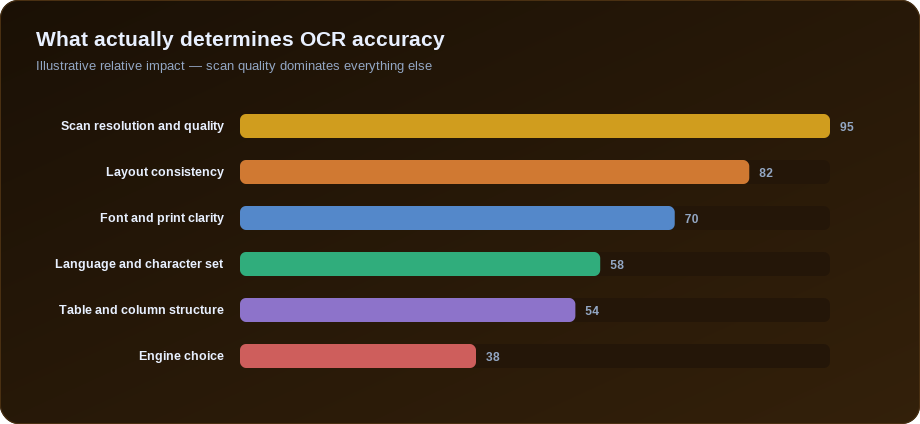
Teams trying to improve OCR results almost always start by changing the OCR engine. That is usually the least effective lever available.
What Actually Determines Accuracy
Indicative relative impact, in the order they are worth attention:
| Factor | Relative impact | Under your control? |
|---|---|---|
| Scan resolution and quality | Very high | Often yes, at the source |
| Layout consistency | High | Partly |
| Font and print clarity | High | At the source |
| Language and character set | Moderate | Configuration |
| Table and column structure | Moderate | Pre-processing |
| Engine choice | Lower than expected | Yes |
The single most valuable action is usually fixing the input — getting documents scanned properly, or getting them supplied digitally in the first place. A native PDF requires no OCR at all, and every hour spent tuning recognition on a bad scan is an hour not spent asking the supplier to email the original.
Scan Settings That Matter
| Setting | Recommendation | Why |
|---|---|---|
| Resolution | 300 DPI for normal text; 400-600 for small print | Below 200 DPI, accuracy falls sharply |
| Colour mode | Greyscale for text; colour only if it carries meaning | Bitonal loses detail on faint print |
| Format | PNG or lossless TIFF; PDF/A for archive | JPEG artefacts corrupt character edges |
| Compression | Minimal | Heavy JPEG compression is a common hidden cause of poor results |
| Orientation | Correct at capture | Rotation is recoverable but adds error |
| Contrast | Adequate, not extreme | Over-thresholding erases thin strokes |
Resolution above 600 DPI does not help and slows processing considerably. Below 200 DPI is not recoverable — no amount of pre-processing restores information the scan never captured.
If documents arrive as phone photographs, guidance to the sender — flat surface, even lighting, whole page in frame, no shadow — improves results more than any code change.
Pre-Processing Steps
Applied in roughly this order:
Deskew. Even 1-2 degrees of rotation degrades line detection and table parsing measurably. Detect the dominant text angle and rotate.
Denoise. Remove speckle from scanning artefacts and paper texture. Median filtering handles most of it; be careful not to erode thin strokes.
Binarisation. Convert to black and white. Adaptive thresholding (Sauvola, Otsu applied locally) handles uneven lighting far better than a global threshold — important for photographed pages where one side is brighter.
Border and shadow removal. Scanner edges and phone-photo shadows are commonly misread as characters.
Deshadow and illumination correction. Necessary for photographed documents.
Contrast enhancement. CLAHE or similar, applied gently.
Dewarping. For photographed pages with curvature, particularly from bound documents.
Region segmentation. Separate text blocks, tables and images before recognition so each gets appropriate treatment.
Resolution upscaling. Modest gains for slightly low-resolution scans; does not create information that was never captured.
Pre-processing is where the accuracy gains are, and the correct order matters — binarising before deskewing, for example, degrades the rotation estimate.
Engine Configuration
Once the input is as good as it can be, configuration is worth attention:
Language and script. Setting the correct language model matters substantially, especially for Indian-language documents and for mixed-script pages. English-only settings on a bilingual document produce nonsense in one half.
Page segmentation mode. Tell the engine what it is looking at — a single column, a sparse form, a single line, a single word. Wrong segmentation mode causes reading-order errors that look like recognition errors but are not.
Character whitelisting. If a field can only contain digits, restrict it. A field constrained to 0-9 will not return O for 0, which eliminates a whole error class.
Dictionary and pattern constraints. Invoice numbers matching a known pattern, dates in a known format, supplier names from a master list — constraining the output space is one of the highest-return changes available.
Per-field OCR. Rather than OCRing a whole page and then locating fields, crop each field region and OCR it with settings appropriate to that field. Slower, considerably more accurate.
That last technique is underused. A date field OCRed with a digit-and-separator whitelist and a date pattern constraint is far more reliable than the same field read as part of a full-page pass.
Measuring Accuracy Honestly
| Metric | Definition | Use |
|---|---|---|
| Character error rate (CER) | Wrong characters / total characters | Engine and pre-processing comparison |
| Word error rate (WER) | Wrong words / total words | Text-heavy documents |
| Field accuracy | Fields fully correct / total fields | The operationally relevant measure |
| Document accuracy | Documents with every field correct | Drives the review workload |
| Straight-through rate | Documents needing no human touch | The commercial measure |
The compounding arithmetic again: 99% field accuracy across 20 fields gives 0.99²⁰ ≈ 82% document accuracy. Small per-field improvements compound significantly across many fields, which is why per-field optimisation is worth the effort.
Build a ground-truth set. Two hundred representative documents, manually keyed, covering your best and worst input quality. Every change is measured against it. Without a ground-truth set you are guessing, and "it looks better" is not a measurement.
Confidence Scores and When to Trust Them
Most engines return per-character or per-field confidence. These are useful but imperfect:
- High confidence can be wrong — a clean misread of
5as6may score highly - Low confidence is usually right to flag — it correlates well with genuine problems
- Confidence is not comparable across engines, or across versions of the same engine
Use confidence to route to human review, not as a quality guarantee. Combine it with validation rules — an arithmetic check that passes is stronger evidence of correct extraction than any confidence score.
When to Stop Optimising
There is a point where more engineering costs more than the residual manual work. Reach it deliberately:
- Fix input quality at the source — largest available gain
- Implement solid pre-processing
- Configure per-field OCR with constraints
- Add validation rules that catch what OCR cannot
- Route the remainder to human review
- Feed corrections back as training data
Step 5 is not an admission of failure. A pipeline processing 85% automatically and routing 15% to a well-designed review screen delivers most of the value at a fraction of the cost of chasing the last few percent. And step 6 means that share shrinks over time without further engineering.
Indian Document Considerations
Multi-script pages. Documents mixing English with Devanagari or other Indian scripts need multi-language configuration; a single-language setting garbles the other script entirely.
Indian numerals and date formats. DD/MM/YYYY versus MM/DD/YYYY ambiguity is a genuine data-integrity risk — 03/04/2026 is two different dates. Validate against context.
Rupee formatting. Lakh and crore separators (12,34,567) differ from the three-digit grouping most parsers assume by default.
Stamps and signatures overlapping text are common on Indian commercial documents and interfere with recognition; region segmentation helps.
Carbon copies and dot matrix print remain common in some sectors and are genuinely hard — often the honest answer is manual keying or getting the document supplied digitally.
The Tesseract documentation covers language data and page segmentation modes in detail, and OpenCV provides the pre-processing operations described above.
A Practical Optimisation Sequence
Work in this order, measuring against the ground-truth set after each step. Stopping early is fine; skipping ahead is not.
| Step | Typical gain | Effort |
|---|---|---|
| 1. Get documents supplied digitally where possible | Removes OCR entirely for that share | Low — it is a conversation |
| 2. Fix scan settings at source (300 DPI, greyscale, lossless) | Large | Low |
| 3. Deskew and adaptive binarisation | Large on poor scans | Low |
| 4. Correct language and page segmentation configuration | Moderate to large on mixed-script pages | Very low |
| 5. Per-field cropping with character constraints | Moderate, and compounds across fields | Medium |
| 6. Validation rules catching what OCR cannot | Converts errors into flagged exceptions | Medium |
| 7. Alternative engine or commercial API | Variable, often small | Medium |
| 8. Custom model training | Variable | High |
Most teams start at step 7. Steps 1 to 4 are cheaper, faster and usually deliver more.
Measure after every step and keep the record. It is common to find that step 3 delivered a large improvement and step 7 delivered almost nothing, and without measurement that finding is invisible — leaving the team paying for a premium engine that is not earning its cost.
One caution on step 5: per-field cropping depends on knowing where the field is, so it works with templates and with models that return bounding boxes. On a document whose layout is unknown, you need the full-page pass first to locate fields, then a second targeted pass to read them accurately.
Frequently Asked Questions
How do I improve OCR accuracy? Fix scan quality first — 300 DPI, greyscale, lossless format. Then pre-process (deskew, denoise, adaptive binarisation), configure language and page segmentation correctly, and constrain output per field.
What resolution should I scan at? 300 DPI for normal text, 400-600 for small print. Below 200 DPI accuracy degrades badly; above 600 adds little.
Does the OCR engine matter? Less than input quality and pre-processing. Change the engine after those are addressed, not before.
Why is my OCR bad on phone photographs? Uneven lighting, shadows, perspective distortion and page curvature. Deshadowing, dewarping and adaptive binarisation help, but capture guidance to the sender helps more.
What is a good character error rate? Under 1% on good-quality scans of printed text. Poor scans, unusual fonts and handwriting are substantially worse.
Can OCR read handwriting? Clear printed handwriting in structured fields, with moderate reliability. Cursive remains unreliable and should route to human review.
Should I trust confidence scores? Use them to route exceptions, not as a guarantee. Combine with validation rules, which are stronger evidence.
Why do dates come out wrong? Usually format ambiguity rather than misrecognition. Constrain the expected format and validate against context.
How do I handle multi-language documents? Configure the OCR engine with all relevant languages, and segment regions by script where possible.
Drowning in PDFs that should be a database? DSTechnoverse builds document data extraction pipelines — ingestion, OCR, field extraction, validation rules and delivery into your systems, with a human review path for exceptions. We are based in Indore, Madhya Pradesh and work with clients across India. See our data analytics and software development services, or talk to our team about your documents.