Most CRM selection processes start with a shortlist of vendors and end with whichever demo was most impressive. That sequence reliably produces a system that does not fit how the business actually sells.
This is a better order.
Start With Your Process, Not With Vendors
Before looking at any software, document how a customer actually reaches you and becomes a sale today.
Walk it end to end with the people who do it:
- Where do leads come from? List every source honestly, including "the owner's contacts" and "walk-ins".
- Who touches a lead first, and what do they do?
- What makes a lead worth pursuing?
- What are the real stages between interest and order?
- Where do deals typically stall, and why?
- What happens after the sale — onboarding, support, renewal?
- What does management need to see, and when?
You will find disagreement. Two salespeople will describe different processes. That is the most valuable output of the exercise, and it needs resolving before any tool encodes one version.
A CRM implements a process. If you have not agreed the process, you are asking a vendor to choose it for you.
Requirements: Must-Have vs Nice-to-Have
Write requirements as things the business must be able to do, not as features.
Bad: "Must have AI lead scoring." Good: "A salesperson must be able to see which of their 60 open leads to call today."
The second lets you evaluate several solutions, including simple ones. The first pre-selects a feature you may not need.
Split the list into must-have (a deal-breaker if absent) and nice-to-have. Be disciplined — if everything is a must-have, the list cannot discriminate. A useful test: would you reject an otherwise excellent system over this single item? If not, it is nice-to-have.
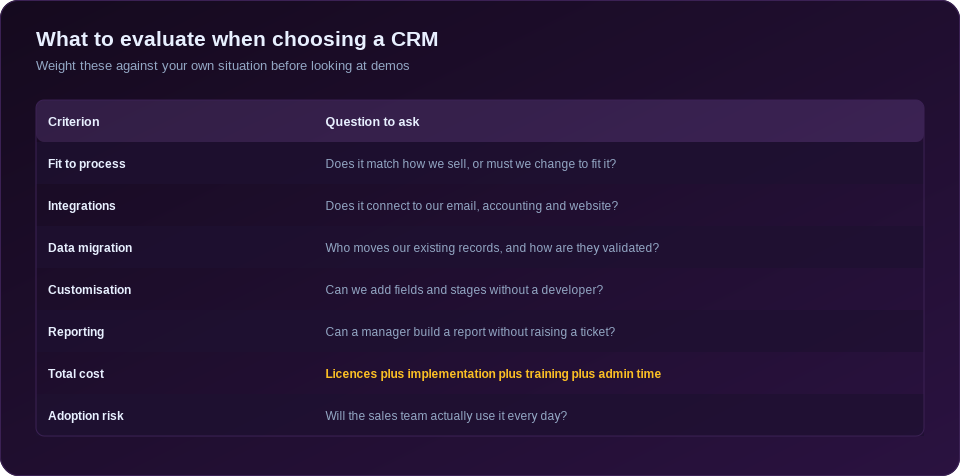
Evaluation Criteria That Matter
| Criterion | The question to ask |
|---|---|
| Fit to process | Does it match how we sell, or must we change to fit it? |
| Ease of use | Will a salesperson update it on a phone, between meetings? |
| Integrations | Does it connect to our email, accounting, website, WhatsApp? |
| Data migration | Who moves our records, and how is the result validated? |
| Customisation | Can we add a field or stage without a developer? |
| Reporting | Can a manager build a report without raising a ticket? |
| Mobile | Is the mobile app genuinely usable, or a viewer? |
| Support | What are the hours, in which time zone, in which language? |
| Total cost | Licences plus implementation plus training plus admin time |
| Exit | Can we export all our data if we leave, and in what format? |
That last row is worth more attention than it usually gets. Ask before signing, not when leaving.
The Costs That Are Not on the Price Page
| Cost | Why it is underestimated |
|---|---|
| Implementation | Configuration and process work, not installation |
| Data cleaning and migration | Almost always the longest task |
| Integration | Each connection is its own small project |
| Training | Treated as a one-off demo rather than role-based sessions |
| Ongoing administration | Someone must own users, fields and changes |
| Add-on modules | Marketing, service and analytics are often priced separately |
| Storage and API limits | Overage charges appear at scale |
Licences are frequently the smallest line in year one. For price ranges by tier and worked first-year budgets, see CRM software price in India.
Running a Demo That Tells You Something
Vendor-led demos show the product at its best on their data. That reveals very little.
Send a scenario in advance. Write three or four things you actually do — "a lead arrives from our website form, gets qualified, receives a quote, and goes quiet for three weeks" — and ask them to demonstrate exactly that.
Insist on your own data. Ask to import a sample of your real records. Messy data behaves differently from demo data.
Have the actual users in the room. Not just the sponsor. The salespeople who will use it daily will spot friction that a manager will not.
Ask what it does badly. Every honest vendor can answer. One who claims no weaknesses is telling you something about how they will behave after the contract.
Questions that reveal fit quickly:
- Show me how a salesperson logs a call from their phone in under 30 seconds.
- Show me how I add a new stage to the pipeline myself.
- Show me what happens when two records for the same company exist.
- Show me a report of deals lost by reason, built live.
- What breaks if our internet is unreliable?
Trial Properly
A trial where nobody enters real data proves nothing.
Run a two-week structured pilot with three or four real users, real leads and real deals. Agree in advance what success looks like — for example, every user logs their activity daily without being chased.
Then ask them directly: would you rather go back to the spreadsheet? The answer is usually honest and decisive.
Decision Framework
Score shortlisted options against weighted criteria. A simple approach that works:
- List your must-haves. Anything failing one is out — no exceptions, or the list is meaningless.
- Weight the remaining criteria out of 100 based on your situation.
- Score each option 1-5 per criterion.
- Multiply, total, and compare.
- Then apply judgement. If the numbers say one thing and the pilot users say another, trust the pilot users — adoption beats features.
- Write down why you chose, so the decision can be revisited on evidence.
Sizing the Platform to Your Stage
Matching platform scale to business stage prevents both of the common mistakes — buying something too heavy to administer, and outgrowing something within a year.
Under 5 users, simple process. A free or entry tier is genuinely sufficient. Prioritise speed of setup and ease of use over capability. You are trying to stop losing follow-ups, not build a revenue operations function.
5-25 users, defined process. The mainstream mid-market. You need pipeline management, reporting a manager can run unaided, email integration and mobile that works. Customisation matters here, because your process is now specific enough that a generic pipeline will not fit.
25-100 users, multiple teams. Governance starts to matter — roles and permissions, territory assignment, approval workflows, and a real administrator role. Integration with finance and support systems becomes necessary rather than nice. Expect to need someone whose actual job includes owning the CRM.
100+ users or complex operations. Enterprise platforms, with the implementation cost and timeline that implies. At this point selection is a formal procurement exercise and the integration architecture matters more than the CRM's own features.
The failure pattern worth avoiding: a 12-person business buying an enterprise platform because it will "scale", then never configuring it properly because nobody has the capacity. Buy for the next two years, not the next ten.
Signals to Walk Away
- The vendor cannot demonstrate your scenario
- Data export is restricted or chargeable
- Every question is answered with "that's on the roadmap"
- Pricing changes materially when you ask about your real user count
- The implementation partner is different from the vendor and neither takes responsibility
- Your pilot users disliked it
That final signal outweighs almost everything else. A CRM the sales team resents becomes a data-entry chore that gets done badly, and the reports built on it will be wrong.
Involving the Sales Team Without Losing Control
Sales teams are the users, and excluding them guarantees poor adoption. Including them badly turns selection into a feature wish-list.
Involve them in the process mapping. They know how selling actually works, including the parts that never made it into any documented procedure. This is where their input is most valuable and least contested.
Involve them in the pilot. Two weeks of real use produces better evidence than any amount of opinion gathered in a meeting.
Do not put the decision to a vote. Selection has to weigh cost, integration, governance and administration burden — factors the sales team has no visibility of and no reason to weigh. A vote optimises for whichever interface looked nicest in a demo.
Do give them a veto on usability. If the pilot users say the daily workflow is painful, that is disqualifying regardless of how the scorecard came out. Adoption is the whole return.
Be explicit about what changes for them. A CRM usually adds some logging effort in exchange for removing some searching and reporting effort. Saying so plainly earns more cooperation than presenting it as pure benefit, because they will discover the truth in week one either way.
The framing that works: this is about the team's collective pipeline being visible and defensible, not about monitoring individuals. If it is genuinely being introduced as surveillance, adoption will reflect that.
Frequently Asked Questions
How long should selection take? Four to eight weeks including a pilot. Faster usually means skipping process definition.
Should we choose a big-name CRM? Only if it fits. Large platforms bring depth and complexity; smaller ones bring speed and simplicity. Match to your team's capacity to administer it.
Free or paid? Free tiers are genuinely viable for very small teams. The constraint usually appears at automation, reporting depth or user count.
Industry-specific or general-purpose? Industry versions save configuration time if the fit is close. Verify the fit with your own scenario rather than the brochure.
Who should own the decision? Sales leadership, with input from the users and whoever will administer it. Not IT alone.
What if we choose wrong? Migration is possible but costly. This is why the pilot and the data-export question matter before signing. See CRM implementation.
Choosing or implementing a CRM? DSTechnoverse helps businesses select, configure and roll out CRM systems — process mapping, data migration, integration and user training. We are based in Indore, Madhya Pradesh and work with clients across India. See our CRM services, or talk to our team about your sales process.