Document extraction projects are sold on labour saving and frequently justified on a spreadsheet that counts only the licence fee against only the typing time. Both sides of that comparison are wrong, usually in opposite directions.
This article sets out what these projects actually cost, what they actually save, and where the honest answer is not to automate.
The Real Cost
| Cost item | Scale | Often forgotten? |
|---|---|---|
| Software licence or per-page fees | Ongoing, scales with volume | No |
| Integration with target systems | Substantial one-off | Yes |
| Document classification setup | One-off per type | Sometimes |
| Template or rule development | Per layout | Sometimes |
| Model training data labelling | Hundreds of documents | Yes |
| Validation rule design | One-off, needs finance input | Yes |
| Exception review interface | Build or configure | Yes |
| User training and change management | One-off plus ongoing | Yes |
| Parallel running period | Both processes at once | Yes |
| Ongoing maintenance | Layout changes, model drift | Yes |
| Residual manual handling | Exception queue staffing | Yes |
The three that break budgets: integration, the exception review path, and the residual manual work. A pilot that extracts fields from sample PDFs proves nothing about the cost of posting those fields into an ERP with correct coding, approvals and audit trail — and the integration is usually the larger half of the project.
The Real Benefit
| Benefit | How to quantify | Often under-counted? |
|---|---|---|
| Labour on data entry | Volume × time × loaded cost | No |
| Rework from typing errors | Error rate × correction cost | Yes |
| Duplicate payment prevention | Historical duplicate value | Yes — often the largest |
| Early payment discounts captured | Discount value now missed | Yes |
| Faster cycle time | Days saved × value of speed | Depends |
| Audit and compliance effort | Time in audits finding documents | Yes |
| Scalability without headcount | Cost of the hire avoided | Sometimes |
| Data availability for analysis | Enables spend analysis, forecasting | Yes |
| Staff retention | Data entry has high turnover | Rarely counted |
Duplicate payment prevention is routinely the single largest benefit in accounts payable, and it almost never appears in the initial business case. Pull the historical number before writing the case; in many organisations it exceeds the labour saving on its own.
Data availability is the strategic benefit. Once invoices are structured data rather than PDFs, spend analysis, supplier consolidation and cash forecasting become possible — none of which was feasible when the data lived in a filing system. It is hard to quantify in advance and often the largest long-run return.
A Worked Model
Scenario: 3,000 invoices per month, currently keyed manually.
Current state:
| Item | Value |
|---|---|
| Invoices per month | 3,000 |
| Average handling time | 6 minutes |
| Monthly hours | 300 |
| Loaded cost per hour | ₹450 |
| Monthly labour cost | ₹1,35,000 |
| Duplicate payments (historical average) | ₹80,000/year |
| Missed early payment discounts | ₹1,50,000/year |
After automation, at a 60% straight-through rate:
| Item | Value |
|---|---|
| Auto-processed | 1,800 invoices, ~0 minutes each |
| Exceptions | 1,200 invoices at 3 minutes each = 60 hours |
| Monthly labour cost | ₹27,000 |
| Monthly saving | ₹1,08,000 |
| Annual labour saving | ₹12,96,000 |
| Duplicate prevention | ₹80,000 |
| Discounts captured (60% of missed) | ₹90,000 |
| Total annual benefit | ₹14,66,000 |
Costs:
| Item | Value |
|---|---|
| Software (per page, annual) | ₹3,60,000 |
| Implementation and integration | ₹8,00,000 one-off |
| Ongoing maintenance | ₹1,20,000/year |
| Year one total | ₹12,80,000 |
| Year two onwards | ₹4,80,000 |
Payback: roughly year one break-even, with about ₹9.9 lakh net annual benefit from year two.
Note how sensitive this is to two numbers: volume and straight-through rate. At 1,000 invoices a month the case is marginal. At 40% STP it is materially weaker. Model both conservatively — and note that the STP rate in month one is always lower than the steady-state rate.
When Not to Automate
Volume is too low. Below roughly 500 documents a month, the fixed implementation cost rarely clears. Improve the manual process instead — better templates, a shared inbox, a checklist.
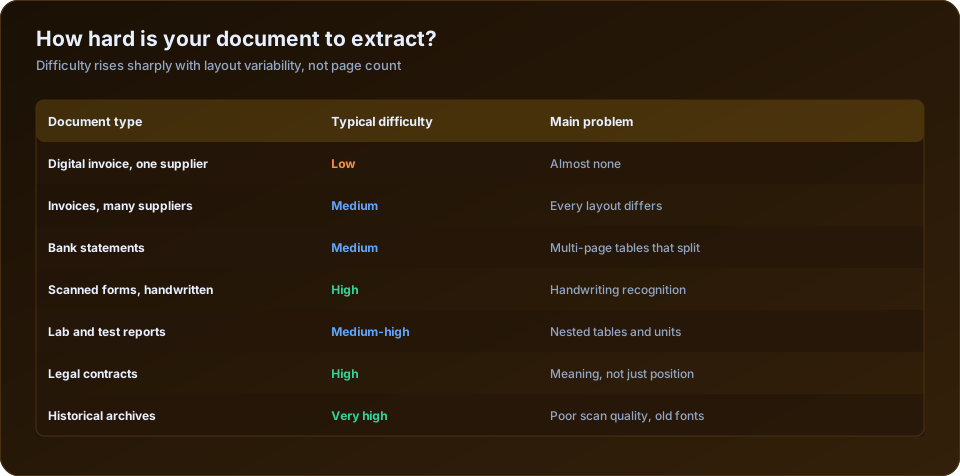
Documents are too varied. Fifty document types at low volume each means fifty configurations for little return per type. Automate the top two or three by volume and leave the rest manual.
Input quality is unfixable. Faded carbon copies, handwritten forms, poor photographs. If accuracy will sit at 70%, the review workload eats the saving. Fix the input first, or accept manual handling.
The process is about to change. Automating a process that will be replaced by a new ERP in nine months wastes the integration work, which is the expensive part.
The real problem is upstream. If 60% of invoices arrive as scans because suppliers were never asked to send PDFs, supplier onboarding is dramatically cheaper than extraction engineering — and delivers better accuracy.
That last point deserves emphasis. The cheapest document extraction project is the one you avoid by fixing how documents arrive. An e-invoice or a native PDF requires no OCR, no template and no model. Before commissioning a pipeline, work out what share of volume could simply be supplied in a better format, and go and ask.
Pricing Models
| Model | Typical structure | Best when |
|---|---|---|
| Per page | Fixed rate per page processed | Predictable, moderate volume |
| Per document | Rate per document regardless of pages | Multi-page documents |
| Tiered subscription | Volume bands | Stable volume |
| Licence plus maintenance | Perpetual or annual licence | High volume, on-premise |
| Outcome-based | Per straight-through document | Vendor confident in accuracy |
| Build and own | Development cost, then infrastructure only | Very high volume, unusual documents |
Model the cost at target volume, not pilot volume. Per-page pricing that is trivial at 200 documents a month is a significant line item at 20,000. This is the most common unpleasant surprise in year two.
Making the Case
- Baseline honestly. Time a real sample including chasing, rework and filing — not the optimistic estimate.
- Pull the historical error and duplicate cost. Usually the largest single benefit and always the most persuasive.
- Use a conservative STP rate. 50-60% in year one for a mixed supplier base.
- Count the exception handling cost. Automation does not go to zero labour.
- Include integration properly. It is usually the largest one-off cost.
- Model years one, two and three separately. Year one carries the implementation.
- State what could go wrong — worse input quality than expected, lower STP, integration overrun. A case acknowledging these is more credible than one that does not.
- Name the strategic benefit — structured data enabling analysis — without pretending to have quantified it precisely.
Point 7 matters because these projects have a pattern of overrunning on integration. A proposal that pre-empts the question with a contingency reads as competent rather than cautious.
Once the data is flowing, what you do with it is the next question — see business dashboard development for turning newly structured spend data into something decisions are made from.
Phasing the Investment
The full business case does not have to be committed at once, and phasing reduces the risk that a large integration budget is spent before anyone knows the accuracy achievable on real documents.
| Phase | Scope | Typical duration | What it proves |
|---|---|---|---|
| 1 | Accuracy pilot on 200 real documents, no integration | 2-3 weeks | Achievable accuracy on your inputs |
| 2 | One document type, one source, manual export | 4-6 weeks | Straight-through rate in production conditions |
| 3 | System integration and exception workflow | 6-10 weeks | End-to-end labour saving |
| 4 | Additional document types and sources | Ongoing | Incremental return per type |
Phase 1 is the highest-value few weeks in the project, because it uses your documents rather than a vendor's demonstration set. Vendors demonstrate on clean samples; your input mix includes the phone photographs. The accuracy figure from phase 1 is the number the whole business case rests on, and it costs very little to obtain.
The decision gate after phase 2 should be explicit: if the straight-through rate in production conditions is materially below the business case assumption, either fix the input quality first or stop. Continuing to integration on a 35% straight-through rate turns a labour-saving project into an expensive way to move typing from one screen to another.
Frequently Asked Questions
How much does document data extraction cost? Software is typically per page or per document, plus a substantial one-off integration and configuration cost — frequently the larger half of year one.
What is the ROI of invoice automation? For a few thousand invoices a month, break-even in year one and a meaningful net benefit thereafter is realistic. Volume and straight-through rate drive the answer.
What volume justifies automation? Roughly 500+ documents a month as a rule of thumb, lower where error costs or cycle time are commercially significant.
What is the biggest hidden cost? Integration with the target system, followed by building the exception review path and staffing the residual manual work.
What is the biggest under-counted benefit? Duplicate payment prevention, then early payment discounts captured, then the strategic value of structured data.
Should I build or buy? Buy for common document types at moderate volume. Build only for very high volume or genuinely unusual documents where per-page pricing becomes prohibitive.
When is automation the wrong answer? Low volume, highly varied document types, unfixable input quality, or an imminent system replacement.
How long until it pays back? Typically 12-24 months for a mid-size deployment, faster where duplicate payments or missed discounts are significant.
Does it eliminate headcount? It changes the work from keying to exception handling and supplier management. Whether headcount falls depends on volume growth and what else the team does.
Drowning in PDFs that should be a database? DSTechnoverse builds document data extraction pipelines — ingestion, OCR, field extraction, validation rules and delivery into your systems, with a human review path for exceptions. We are based in Indore, Madhya Pradesh and work with clients across India. See our data analytics and software development services, or talk to our team about your documents.