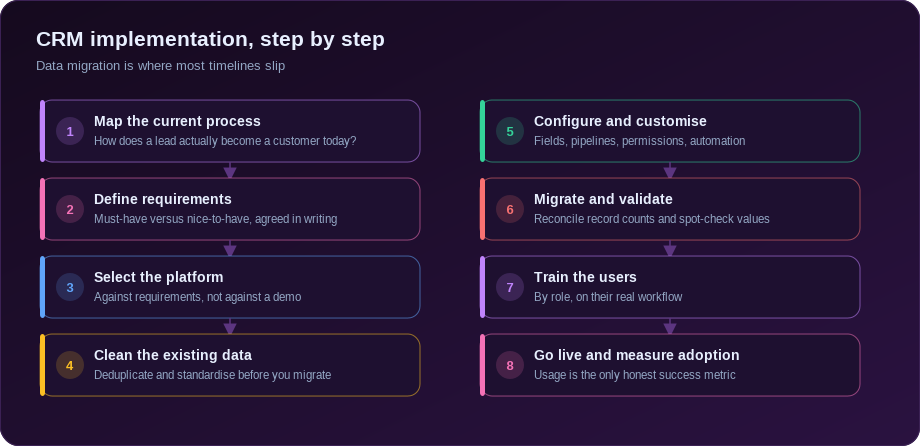
Buying the CRM is the easy part and takes a day. Implementation is where the value is created or destroyed, and it takes weeks.
Step 1: Map the Current Process
Duration: 1-2 weeks.
Document how a lead actually becomes a customer today — by observing, not by asking for a description.
Expect to find that the documented process and the real one differ, and that two salespeople work differently. Both findings are useful. Resolve them into one agreed process before configuring anything.
Output: A written process with named stages and the criteria for moving between them.
Step 2: Define Requirements and Success
Duration: 1 week.
Must-haves and nice-to-haves, in business terms. And critically, what success looks like — usually a usage measure like "every salesperson logs their activity daily" rather than "the system is live".
Output: A signed-off requirements list and a success measure.
Step 3: Select the Platform
Duration: 2-4 weeks including a pilot.
Covered in how to choose a CRM system.
Step 4: Clean the Existing Data
Duration: 2-4 weeks. This is where timelines slip.
Whatever mess exists in your spreadsheets and inboxes will exist in the CRM unless it is cleaned first. Migrating dirty data is the single most common cause of a failed CRM.
The work:
| Task | What it involves |
|---|---|
| Consolidate sources | Every spreadsheet, inbox export and legacy system |
| Deduplicate | Same company entered three ways; same person twice |
| Standardise | "Pvt Ltd", "Private Limited", "P Ltd" — pick one |
| Validate | Phone number formats, email syntax, postcodes |
| Enrich | Fill critical gaps; leave non-critical ones blank |
| Archive | Genuinely dead records go to an archive, not the CRM |
| Assign ownership | Every record needs an owner from day one |
Do not migrate everything. A CRM loaded with 40,000 records where 30,000 are stale contacts from 2019 is harder to use than one with 10,000 live ones. Archive the rest — it remains recoverable.
Output: A clean, deduplicated dataset with an agreed field mapping.
Step 5: Configure
Duration: 2-3 weeks.
Set up pipelines, stages, fields, user roles, permissions and automation to match the process from step 1.
The main risk here is over-configuration. Enthusiastic teams add forty custom fields, six pipelines and elaborate automation before anyone has used the system. Then real use reveals that half of it is wrong, and unpicking it is harder than building it.
Configure the minimum that supports the agreed process. Add on evidence of need after go-live.
Output: A configured system matching the documented process.
Step 6: Migrate and Validate
Duration: 1-2 weeks.
Import the cleaned data, then validate it properly — this step gets skipped and it should not.
- Reconcile record counts: source versus destination, per object
- Spot-check 20-30 records field by field against the source
- Verify relationships survived: contacts linked to the right accounts, deals to the right contacts
- Check special characters, dates and currency values
- Confirm ownership assignment is complete
Run a test migration first into a sandbox if the platform offers one.
Output: Validated data with a reconciliation record you can show later.
Step 7: Train by Role
Duration: 1-2 weeks.
A single all-hands demo is not training. Run short, role-specific sessions on the workflow each group actually performs.
| Role | Focus |
|---|---|
| Salesperson | Logging activity fast, especially on mobile; updating deal stage |
| Sales manager | Pipeline review, forecasting, coaching from the data |
| Marketing | Lead capture, campaign attribution, list segmentation |
| Support | Case handling, customer history |
| Administrator | Users, fields, permissions, troubleshooting |
Train on their real data, not a demo dataset. And record the sessions — new joiners in month four need them too.
Output: Trained users and short reference material per role.
Step 8: Go Live and Measure Adoption
Duration: ongoing.
Two approaches:
Big bang — everyone moves at once. Faster, but a problem affects everybody. Phased — one team or region first. Slower, but issues surface at small scale.
For most small and mid-sized businesses, phased by team works better.
After go-live, measure adoption weekly for the first quarter: logins, records updated, deals moved, activities logged. Adoption is the success measure agreed in step 2.
Where Implementations Actually Fail
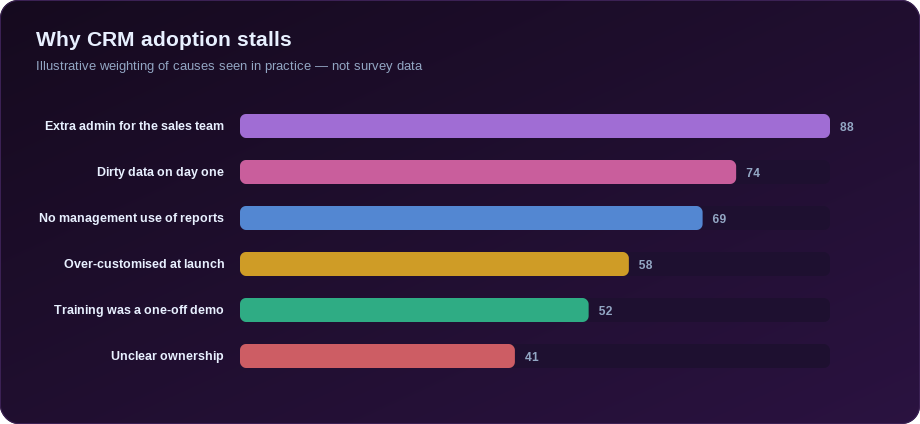
Extra admin for the sales team. If the CRM adds twenty minutes of typing a day and gives the salesperson nothing back, they will not use it. Make logging fast — mobile, voice notes, email sync, minimal required fields — and give them something useful in return, such as their own pipeline view and automatic reminders.
Dirty data on day one. Users open it, see wrong information, conclude it is unreliable, and go back to their own spreadsheets. Very hard to recover from.
Management does not use the reports. If leaders still ask for a spreadsheet update in the weekly meeting, the team correctly concludes the CRM is optional. Management must run the meeting from the CRM.
Over-customised at launch. Complexity before understanding.
Training was a one-off demo. People forget, new joiners never learn, workarounds spread.
No named owner. Fields proliferate, duplicates return, nobody maintains it.
Integrations: Do Them in the Right Order
Integrations are where scope quietly expands. A disciplined sequence keeps the project deliverable.
Do before go-live:
- Email and calendar sync. Without it, salespeople log activity manually and adoption suffers immediately. This is the one integration that is genuinely not optional.
- Website form capture. Leads arriving by email into someone's inbox will not reach the CRM reliably.
Do shortly after go-live:
- WhatsApp or messaging. For most Indian sales teams this carries more conversation than email. Verify the integration works in practice rather than accepting a roadmap promise — see whether messages actually attach to the right contact.
- Telephony. Click-to-call and automatic call logging remove a large share of manual entry.
Do later, on evidence:
- Accounting and invoicing. Valuable, but it is a project in itself and it can wait until the CRM is stable.
- Marketing automation. Only once lead data is clean enough to segment.
- Support ticketing. Once you know what customer context service actually needs.
The mistake is attempting all of them before go-live. Each integration adds a dependency, a failure mode and a testing burden, and together they delay the launch past the point where sponsor patience runs out.
A Realistic Timeline
| Phase | Small business | Mid-sized |
|---|---|---|
| Process mapping | 1 week | 2 weeks |
| Requirements | 1 week | 1-2 weeks |
| Selection | 2 weeks | 4 weeks |
| Data cleaning | 2 weeks | 4-6 weeks |
| Configuration | 1-2 weeks | 3 weeks |
| Migration and validation | 1 week | 2 weeks |
| Training | 1 week | 2 weeks |
| Total | 9-10 weeks | 18-21 weeks |
Anyone promising a two-week implementation is either scoping something very small or skipping data cleaning — and skipping data cleaning is what causes the failure.
Post-Launch: The First Ninety Days
Go-live is the start of the risky period, not the end of the project. Most implementations that fail do so in the eight weeks after launch, quietly.
Week 1-2 — daily contact. Check in with every user. Fix small friction immediately: a field in the wrong place, a required entry nobody needs, a mobile screen that is awkward. Small irritations compound into abandonment fast, and fixing one on day three earns more goodwill than fixing ten in month three.
Week 3-4 — run the meeting from the CRM. This is the single most effective adoption lever available. If the sales review happens on screen from live pipeline data, records get updated before the meeting. If leadership still accepts a spreadsheet, the CRM is optional and everyone knows it.
Week 5-8 — review usage data, not opinions. Who is logging in? Whose records are stale? Address individuals directly rather than sending a general reminder to everyone, which the people already complying will find irritating and the people not complying will ignore.
Week 9-12 — start adding. Only now, with evidence of where the real manual effort sits, introduce automation and the second wave of integrations. Requests made at this point are grounded in use rather than imagination.
Throughout — protect against configuration creep. Every request to add a field should go through the owner. A CRM accumulates fields the way a desktop accumulates icons, and each one makes the entry form slower.
Frequently Asked Questions
How long does CRM implementation take? Nine to ten weeks for a small business, four to five months for a mid-sized one. Data cleaning dominates.
Can we implement it ourselves? Yes, for a straightforward setup with a capable internal owner. External help pays off on data migration and integration.
Should we migrate all historical data? No. Migrate active and recently active records; archive the rest.
What if the sales team resists? Usually a signal that it costs them more than it gives them. Reduce required fields, improve mobile logging, and make sure they get value back.
When do we add automation? After go-live, once you can see where the manual effort actually is.
How do we measure success? Adoption first — is it being used? Then process metrics such as cycle length and conversion. Revenue attribution comes much later.
What is the most common mistake? Migrating dirty data. See CRM data migration.
Choosing or implementing a CRM? DSTechnoverse helps businesses select, configure and roll out CRM systems — process mapping, data migration, integration and user training. We are based in Indore, Madhya Pradesh and work with clients across India. See our CRM services, or talk to our team about your sales process.