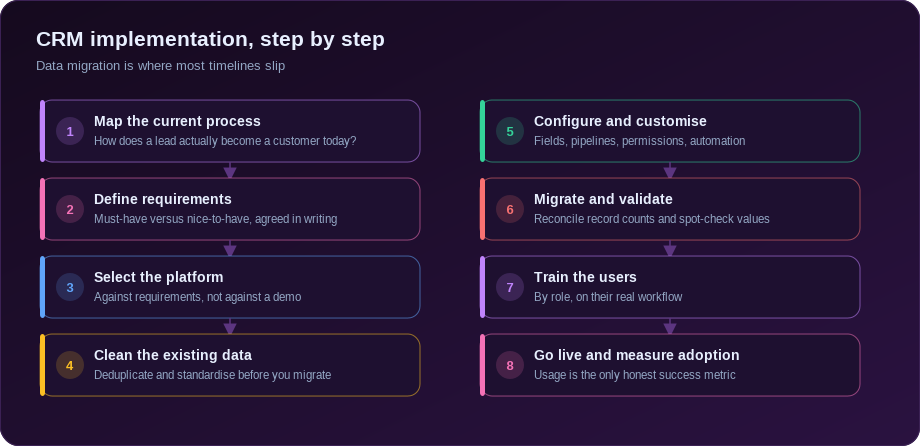
Ask anyone who has run a CRM project where the time went, and the answer is data migration. It is consistently underestimated, and getting it wrong damages trust in the system before anyone has used it properly.
Why It Matters More Than It Sounds
A user opens the new CRM on day one. The first record they check is a customer they know well. The phone number is wrong, the company name is misspelt, and there are two entries for the same business.
They conclude the system is unreliable. They go back to their own spreadsheet. Everyone else does the same.
The technical migration succeeded. The project failed.
First impressions of data quality determine adoption more than any feature. You get one.
Step 1: Audit What You Have
Find every place customer data currently lives. The list is always longer than expected:
- The legacy CRM or contact system
- Accounting software
- Individual spreadsheets on individual laptops
- Email contacts and inbox history
- WhatsApp contacts
- Business cards, forms, notebooks
- Website form submissions
- The founder's phone
For each source, record: how many records, which fields, how current, who owns it, and how good it looks.
Output: A source inventory with an honest quality assessment.
Step 2: Profile the Data
Before deciding anything, measure the mess:
| Check | What you are looking for |
|---|---|
| Completeness | What percentage of records have email? Phone? Company? |
| Duplicates | How many apparent duplicates, by name, email, phone |
| Format consistency | Phone formats, date formats, name capitalisation |
| Validity | Malformed emails, impossible dates, junk entries |
| Staleness | Last contacted date distribution |
| Orphans | Contacts with no company; deals with no contact |
This takes a few hours with a spreadsheet or a script and tells you how long the cleaning will take. Skipping it is why estimates are wrong.
Step 3: Decide What Not to Migrate
This is the highest-leverage decision in the whole exercise.
Migrate: active customers, live opportunities, contacts touched in the last 18-24 months, anything with a legal or contractual reason to retain.
Archive, do not migrate: contacts never engaged, leads dead for years, duplicate fragments, records with no identifying information beyond a name.
Archiving means exporting to a stored file, not deleting. It stays recoverable, and it stays out of the working system.
A CRM with 8,000 live records is more useful than one with 45,000 records of which 37,000 are noise. Search results improve, duplicates fall, and reports become meaningful.
Step 4: Deduplicate
Duplicates arrive from merging sources and from years of inconsistent entry.
Match on several keys, in order of reliability:
- Email address — most reliable for people
- Phone number, normalised — strip spaces, country codes, punctuation first
- Company name, normalised — remove "Pvt Ltd", "Limited", punctuation, case
- Fuzzy name matching — catches typos, produces false positives, always review
Merge rules must be decided before you start, not case by case:
- Which source wins on conflict? Usually the most recently updated.
- Keep the oldest created date, so relationship age is preserved.
- Concatenate notes rather than discarding either.
- Preserve all linked activity from both records.
- Keep both email addresses if they differ; one may still be in use.
Review a sample of automated merges manually. Fuzzy matching will confidently merge two genuinely different people with similar names.
Step 5: Standardise
Consistency is what makes reporting and searching work:
| Field | Standardise to |
|---|---|
| Company suffix | One form — "Pvt Ltd" throughout |
| Phone | One format, with country code |
| Country and state | A controlled list, not free text |
| Job title | Group into a manageable set for segmentation |
| Industry | A defined picklist |
| Dates | ISO format during migration to avoid day/month ambiguity |
| Names | Consistent capitalisation |
That date row causes real damage. A file where some dates are DD/MM and others MM/DD produces silently wrong data, and nobody notices until a report looks odd months later.
Step 6: Map the Fields
Document every source field to its destination field:
| Source field | Destination | Transformation | Notes |
|---|---|---|---|
| CustName | Account.Name | Trim, standardise suffix | |
| Mob | Contact.Mobile | Normalise to +91 format | |
| Status | Opportunity.Stage | Map old values to new stages | Old "Hot" → "Proposal" |
| Notes | Activity.Description | Preserve line breaks |
Where a source field has no destination, decide explicitly: create a custom field, merge into notes, or drop it. Record the decision — someone will ask in six months.
Step 7: Test Migrate
Never go straight to production.
Migrate a representative sample — 100-200 records covering your edge cases — into a sandbox or a test instance. Then check:
- Did all records arrive?
- Are relationships intact? Contacts under the right accounts, deals under the right contacts?
- Did special characters survive? Names with accents, Devanagari script, ampersands
- Are dates correct, not shifted by a timezone or a format assumption?
- Are currency values right, not multiplied or divided?
- Did long text truncate?
Fix, then repeat until the sample is clean.
Step 8: Migrate and Validate
Run the full migration, then validate properly:
Count reconciliation. Source versus destination, per object. Any variance must be explained, not assumed.
Sample verification. 20-30 records checked field by field against the source, chosen randomly rather than conveniently.
Relationship checks. Count orphaned contacts and deals; they should be zero or explained.
Aggregate checks. Total pipeline value in the CRM versus the source. This catches transformation errors that record counts miss.
User verification. Ask each salesperson to check ten of their own customers. They spot errors nobody else can, and it builds early ownership.
Output: A written validation record. Keep it — when someone questions the data in month three, this is the answer.
Step 9: Freeze and Cut Over
Between the final export and go-live, data continues changing in the old system.
Either freeze the old system for the migration window and communicate it clearly, or run a delta migration to move the records that changed in the gap. A freeze is simpler and usually worth the short disruption.
Then make the old system read-only. If people can still edit it, some will, and you will maintain two divergent datasets indefinitely.
Preventing Re-Contamination After Go-Live
A clean migration decays within months unless the entry points are controlled. The same duplicates return, in the same ways.
Turn on duplicate detection immediately. Almost every platform can warn on matching email or phone at the point of entry. It is usually off by default. Enable it before users start creating records.
Restrict free text where a list will do. Industry, lead source, country, stage — these should be picklists. Free-text fields become unreportable within weeks because everyone types something slightly different.
Make required fields genuinely minimal. Counterintuitive but important: long mandatory forms produce junk. People type "x" or "n/a" to get past them. Require only what is truly needed to create the record, and collect the rest as the relationship progresses.
Validate formats at entry. Phone and email format rules stop malformed data at the door rather than in a cleanup project next year.
Control bulk imports. Marketing lists imported directly into the main database are the single largest source of re-contamination. Route them through a staging step with deduplication against existing records.
Schedule a quarterly hygiene review. Thirty minutes checking duplicate counts, completeness rates and stale records. Small and regular beats another large cleanup project.
The principle: migration cleanliness is a state, and states decay without maintenance. Design the entry points so the default outcome is clean.
Common Migration Mistakes
| Mistake | Consequence |
|---|---|
| Migrating everything | Unusable, cluttered system |
| Skipping deduplication | Duplicates multiply after go-live |
| No field mapping document | Nobody can explain where a value came from |
| No test migration | Errors discovered in production |
| Skipping validation | Wrong data trusted until it embarrasses someone |
| Ambiguous date formats | Silent, widespread corruption |
| Old system left editable | Two versions of the truth |
| No owner assigned to records | Nobody feels responsible for accuracy |
Frequently Asked Questions
How long does CRM data migration take? Two to four weeks for a small business, four to six for a mid-sized one. Cleaning dominates; the import itself takes hours.
Should we clean before or after migrating? Before. Cleaning inside the CRM is slower and every user sees the mess in the meantime.
Can we automate deduplication? Partly. Automate exact matches; review fuzzy matches manually.
What about historical emails and calls? Migrate summary activity where possible. Full email history is usually better handled by connecting the mailbox going forward.
Who should do it? Someone who understands both the data and the business. A technically perfect migration by someone who does not know the customers will preserve the wrong records.
How do we handle personal data properly? Under India's Digital Personal Data Protection Act, migration is a good moment to review what you hold, why, and whether you still need it. Archiving unnecessary personal data reduces both clutter and obligation.
What if we find the data is worse than expected? Extend the cleaning phase rather than compressing it. See CRM implementation.
Choosing or implementing a CRM? DSTechnoverse helps businesses select, configure and roll out CRM systems — process mapping, data migration, integration and user training. We are based in Indore, Madhya Pradesh and work with clients across India. See our CRM services, or talk to our team about your sales process.